How app blocking works on iPhone without seeing your apps
Every focus app that blocks distractions runs into a suspicious-looking question. To stop you from opening Instagram, doesn't it first have to know that Instagram is on your phone?
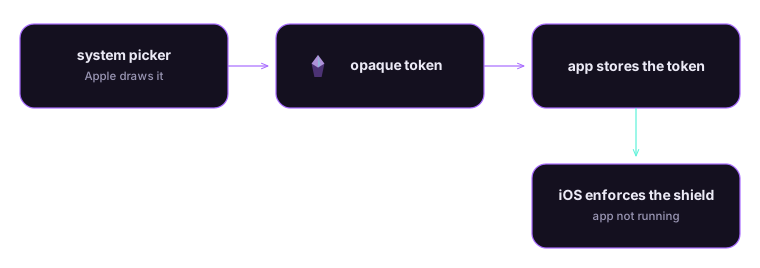
On iPhone the answer is no, and that comes from how Apple built the frameworks rather than from a promise any developer makes. App blocking works through opaque tokens: the app asks iOS to shield something it cannot identify, and iOS does the shielding.
Why an app cannot just list your apps
The way you would build this on a desktop operating system is direct. List the installed applications, let the user tick some boxes, then intercept launches of the ticked ones. Every step needs the list.
iOS has never allowed the first step. No public API returns the apps installed on someone's phone, because that list is personal information. It reveals your bank, your health conditions, your politics and your employer, without a single one of those apps being opened.
So when Apple opened Screen Time controls to third-party developers in iOS 15, it had to solve blocking without handing over the list.
What the app actually receives
Three frameworks do the work: FamilyControls, ManagedSettings and DeviceActivity. The interesting part is the picker.
When Crystalo shows you the app picker, it is not Crystalo's picker. The app hands off to a system interface that Apple draws in a separate process, outside the app's memory. You browse your apps and categories there. What comes back is a set of opaque tokens.
An opaque token is a handle the app can store and compare, but cannot read. It carries no app name and no bundle identifier. Two devices produce different tokens for the same app, so a token cannot be matched against a lookup table built somewhere else either.
| What the app gets | What the app never gets |
|---|---|
| A count of blocked items | The names of the blocked apps |
| Tokens it can store and compare | Bundle identifiers or icons |
| The schedule you configured | A notification when a shield appears |
| Category selections as tokens | The list of apps installed on the device |
The shield itself, the grey screen that appears instead of the app you tried to open, is drawn by the system. The app that requested the block is not running at that moment and is not told which shield fired. Crystalo knows you blocked eleven things. It does not know what they are, because there is nothing on its side to look at.
Why blocking survives a force quit
A focus app that only blocks while it sits in the foreground blocks nothing, since the whole point is that you put the phone down and pick it up ten minutes later.
ManagedSettings and DeviceActivity handle that half. The app writes restrictions into a settings store that the system holds and enforces, and registers activity schedules the system wakes up for. The focus app does not need to be running and does not keep a background process watching you. The rules live with the operating system, which is the only thing that can enforce them reliably.
That is why a block survives a force quit, and why a schedule set on Sunday still fires on Thursday morning without you opening the app in between.
What the research actually says
Focus apps like to cite one study in particular. Ward and colleagues reported in 2017 that having your own phone within reach costs you working memory even when you never touch it:
the mere presence of these devices reduces available cognitive capacity
That result is worth knowing, and so is what happened next. In 2022 Ana C. Ruiz Pardo and John Paul Minda ran a preregistered replication of the second experiment in Acta Psychologica and reported that "the 'brain drain' effect did not replicate: there was no difference between smartphone location conditions on performance on either the o-span task or the go/no-go task."

The honest version is narrower than the marketing version. Moving the phone to another room may not, on its own, make you measurably sharper. What blocking addresses is simpler and less contested: the app you would have opened does not open, so the interruption does not happen.
The costs of knowing nothing
This design gives things up, and the tradeoffs are worth naming.
The app cannot show you a grid of the apps you blocked with their real icons and names. It can only show the system picker again. It cannot tell you that you tried to open a particular app fourteen times on Tuesday, because that event never reaches it. Per-app rules that assume knowledge of the app are impossible by construction.
There is also a platform limit. These frameworks are iOS and iPadOS only, so a Mac build keeps sessions, the collection and iCloud sync while dropping blocking entirely.
We think the trade runs the right way. A focus app asks for your attention at the moment you are least able to guard it, so it should ask for as little else as possible. A promise not to look at your data can be broken quietly. A design that never receives the data cannot be.
Where that leaves your data
Nothing about your blocked apps leaves the device, because nothing identifiable arrives in the first place. Crystalo has no account gate either: sessions, crystals and settings live on the device and sync through your own private iCloud, and the optional sign-in exists for team leaderboards and invite rewards rather than for your blocking data. Screen Time summaries shown inside the app are rendered locally.
The privacy policy Cookie settings says the same thing in more detail, and it is short for the same reason this post is: there is little to describe when the collecting never happens. If that is the kind of app you want on your phone, the waitlist is on the home page.
Questions people ask
Does app blocking work when the focus app is closed?
Yes. The app writes restrictions into a system store through ManagedSettings, and iOS enforces them. The focus app does not need to be running, does not watch you in the background, and the rules survive a force quit or a restart.
Can a focus app see which apps I blocked?
No. The picker runs in a separate system process and returns opaque tokens rather than names or bundle identifiers. The app can compare one token to another, but it cannot resolve a token into an app name, and tokens differ from device to device.
Does Screen Time blocking work on a Mac?
No. FamilyControls, ManagedSettings and DeviceActivity are iOS and iPadOS frameworks with no macOS equivalent. A Mac build of a focus app can keep timers, statistics and iCloud sync, but it cannot shield apps the way the iPhone version does.
Do I need an account for app blocking to work?
Not for Crystalo. Blocking is configured on the device and enforced by iOS, and the data stays on the device and in your private iCloud. Some focus apps do require an account, usually because they sync your settings through their own servers.
Sources
- Meet the Screen Time API. Apple. WWDC21, 2021.
- Family Controls framework documentation. Apple. Apple Developer Documentation.
- Brain Drain: The Mere Presence of One's Own Smartphone Reduces Available Cognitive Capacity. Adrian F. Ward, Kristen Duke, Ayelet Gneezy, Maarten W. Bos. Journal of the Association for Consumer Research, 2017.
- Reexamining the brain drain effect: A replication of Ward et al. (2017). Ana C. Ruiz Pardo, John Paul Minda. Acta Psychologica, 2022.